Google Ads Analytics for Shopify Stores
You know how much you're spending on Google Ads. But do you know how much revenue each campaign actually drives? Mocha Analytics puts your ad spend next to your Shopify revenue so you can see what's working and cut what isn't.
Google API Limited Use Disclosure: Mocha Analytics' use and transfer to any other app of information received from Google APIs will adhere to the Google API Services User Data Policy, including the Limited Use requirements.
Why Connect Google Ads
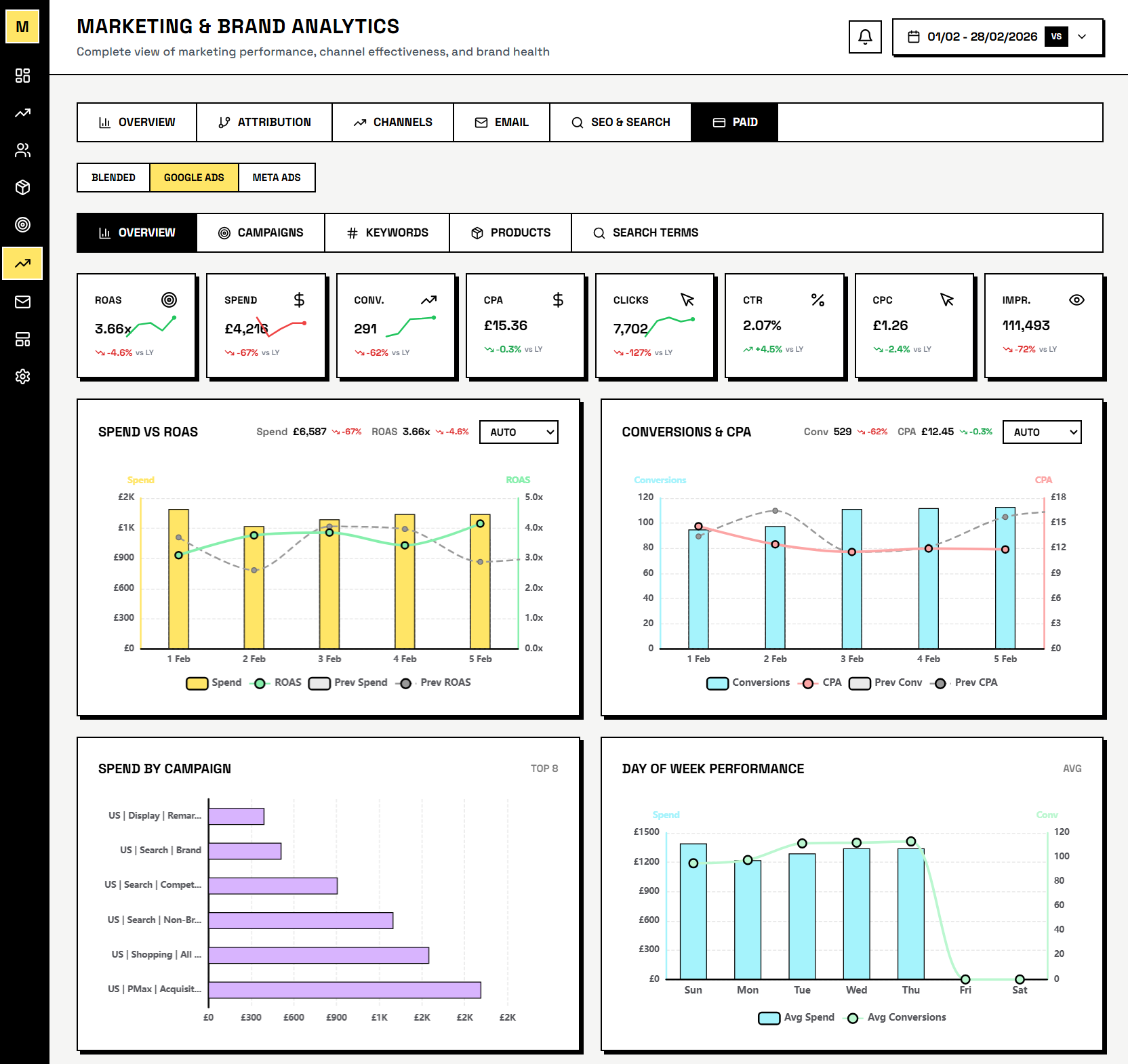
- True ROAS from Shopify data - Google's conversion tracking misses returns, cancellations, and partial refunds. Mocha Analytics calculates ROAS from your actual Shopify revenue.
- Spend alongside everything else - ad spend, CPC, and campaign performance next to your Shopify conversion data. Search vs Shopping, side by side.
- Daily spend analysis in Pulse - Pulse flags when revenue changes correlate with ad spend shifts.
- Campaign-level breakdown - compare performance across Search, Shopping, and Performance Max campaigns with metrics that tie directly back to orders.
- Daily email digests - get your Google Ads performance alongside Shopify and GA4 metrics in a single morning email, without logging in.
What Data We Access
Mocha Analytics requests read-only access to the following Google Ads data via OAuth 2.0 authorization:
- Campaign performance: Impressions, clicks, conversions, cost, and ROAS for each campaign
- Keyword performance: Click-through rates, cost-per-click, and quality scores for your keywords
- Search term reports: Actual search queries that triggered your ads
- Shopping performance: Product group metrics, shopping campaign spend, and product-level ROAS
All access is read-only. Mocha Analytics never modifies your campaigns, budgets, bids, or ad content. We cannot make changes to your Google Ads account.
We do not use your Google Ads data for advertising, profiling, remarketing, or any purpose other than displaying analytics to you. Your data is never sold, shared with third parties, or used to build advertising profiles.
Security & Privacy
- OAuth 2.0: We use Google's standard OAuth 2.0 flow to request authorization. Your Google password is never shared with Mocha Analytics.
- Encryption: All data is encrypted in transit (TLS/SSL) and at rest. API credentials are stored using application-level encryption.
- Limited Use: Mocha Analytics' use and transfer of information received from Google APIs adheres to the Google API Services User Data Policy, including the Limited Use requirements.
- Revocation: You can disconnect Google Ads from your Mocha Analytics account settings at any time. You can also revoke access at myaccount.google.com/permissions.
For full details on how we store, retain, and protect your data, see our Privacy Policy and Terms of Service.
How to Connect
Connect your Google Ads account in your Mocha Analytics dashboard under Settings > Integrations. You will be asked to authorize read-only access via Google's OAuth consent screen.
See Your True ROAS
Mocha Analytics is in closed beta. Request access to see Google Ads spend alongside real Shopify revenue.